
Receipts and invoices, in your own Google Drive.
Books your own AI can read.
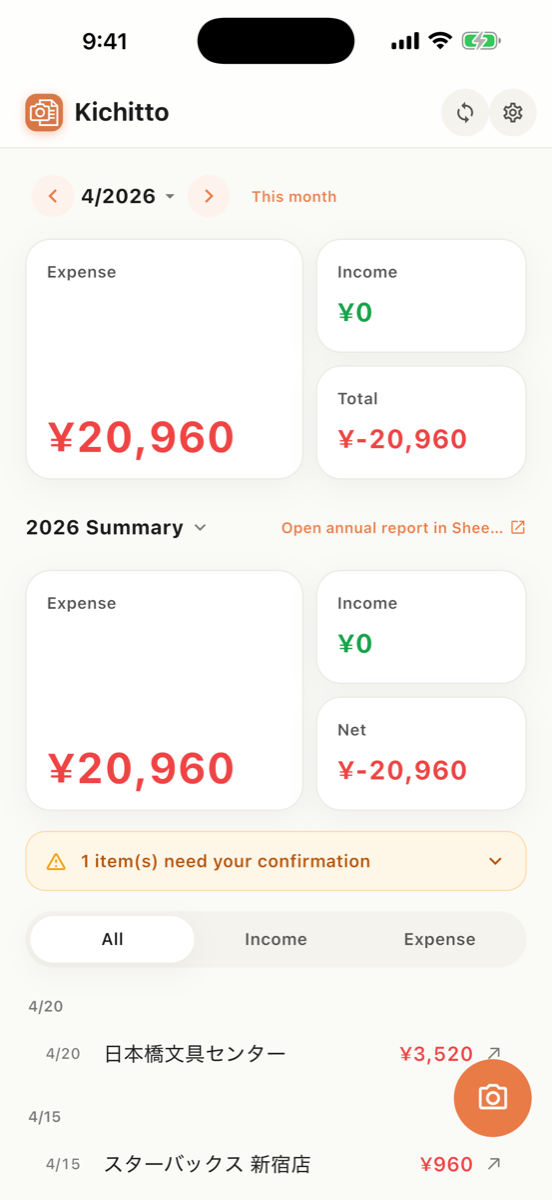
Receipts and invoices for solo founders. Snap once and AI logs it; issue invoices from the app; connect Claude or another MCP-capable AI and your books answer questions.


Data lives in your Drive
Saved to your own Google Drive. We never hold your data.
Logged in one tap
Seconds from photo to record. Zero manual entry.
One link to your accountant
Just share the Drive URL. No exporting or tidying up.
Your own AI reads your books.
Just add the connector to Claude, or to any AI CLI where you can configure MCP. Available on every plan, including the free one.
FY2026 (Apr–Jul) expenses total ¥412,800.
3 expenses are missing an invoice registration number. Want to review them?
Connects to Claude (MCP). Also works from any AI CLI where you can configure MCP.
Bookkeeping, done in three steps
Capture
One tap per receipt. AI extracts vendor, date, amount and T-number, then appends one row to your Sheet.
Issue
Send invoices from the app too. Pick a client, issue it, and book the income right there.
Connect
Add the connector to Claude, or to any AI CLI where you can configure MCP yourself. Totals and reconciliation, just by asking.
Just right for a team of one
Append-only to Sheets
Never overwrites existing rows. Adds one tidy line at a time.
Auto currency conversion
Foreign receipts converted to JPY at the monthly reference rate, original kept.
PDF & multi-page
Paper receipts, PDF invoices and multiple pages — all handled.
Qualified invoices
Auto-extracts invoice (T-number) details and tax breakdowns.
Nothing kept on our servers
Images and details aren't stored on our servers after processing.
Issue invoices and receipts
Save your clients once, then issue an invoice by picking one. The PDF lands in your Drive and the income can be booked on the spot.
Your own AI can read your books
Connect Claude (verified on a live connection), or any AI CLI where you can configure an MCP connector yourself. Ask "what are my expenses this year?" for totals and search, reconcile bank statements, and add missing entries after you confirm them.
Simple — pay for what you use
Free
Lite
Pro
Prices include tax and may change.